.svg)
Clone your voice
Own the meeting
A conversation AI co-pilot that sits with you in the moment feeds on your files, speaks in your voice, and delivers real-time answers powered every leading model




Pressure doesn’t make you less capable.
It blocks access to what you already know
In high-stakes moments - sales calls, investor pitches, critical meetings -
performance drops not because of lack of skill, but because pressure disrupts clarity
performance drops not because of lack of skill, but because pressure disrupts clarity
Pressure blocks access to your intelligence
You know what to say - but stress cuts you off from it in the moment.
You react instead of lead
Instead of driving the conversation, you’re just trying to survive it.
You face critical conversations alone
There’s no time to pause, think, or ask for help - every decision is yours.
Three layers of intelligence. One system.
Oro combines speed, judgment, and authenticity — so you can perform clearly under pressure.

Click
AI Intelligence
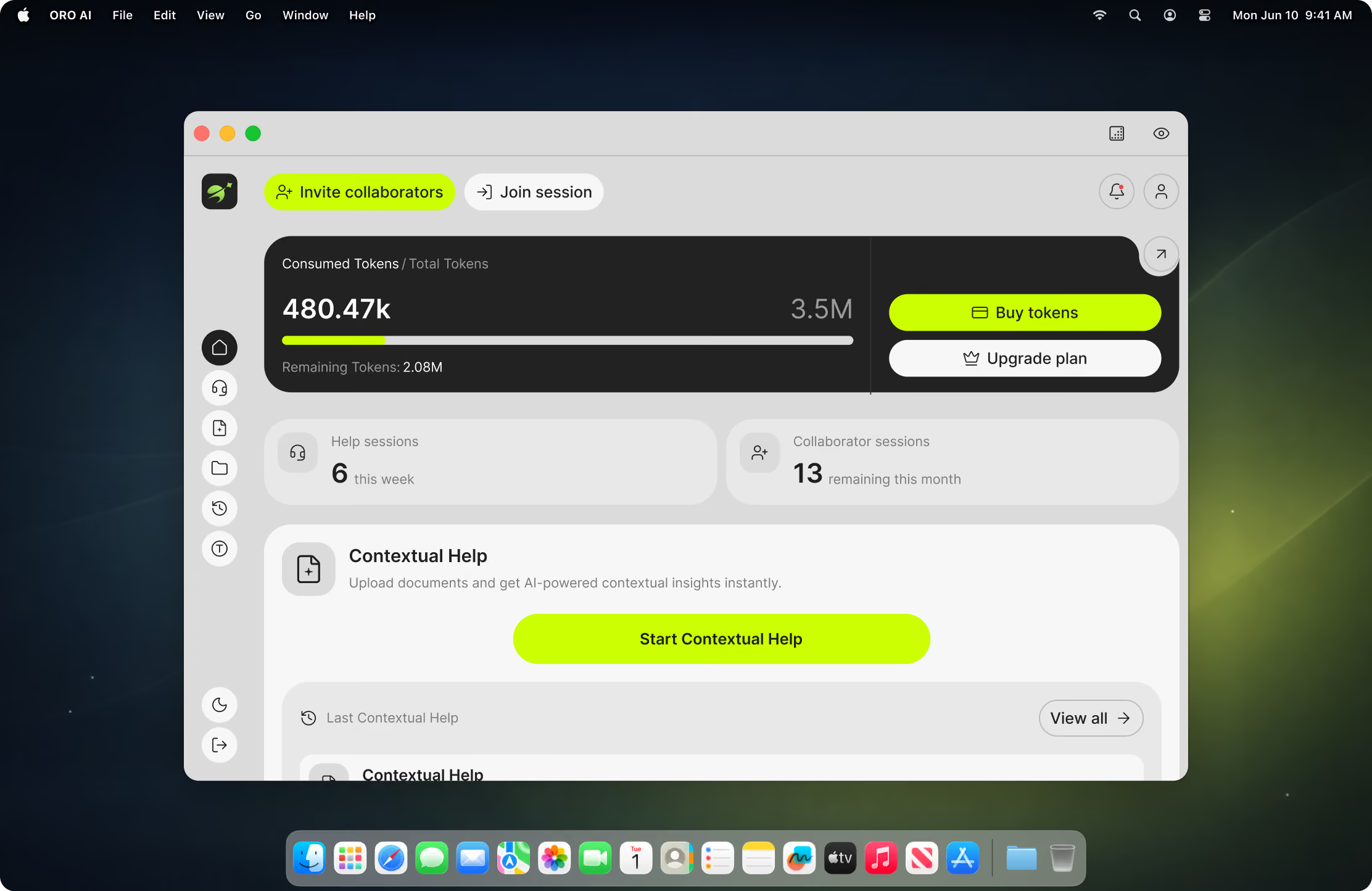
AI processes context instantly - surfacing ideas, structure, and suggestions in real time, while the conversation is happening.

You/Your Voice
All insight flows through your voice - so responses stay natural, confident, and truly yours.
.avif)
.avif)
.avif)
.avif)

Human Expertise
Invite a trusted colleague, mentor, or expert to guide you when experience, context, or instinct is required.
.avif)
.avif)
.avif)

AI Intelligence
AI processes context instantly - surfacing ideas, structure, and suggestions in real time, while the conversation is happening.
You/Your Voice
All insight flows through your voice - so responses stay natural, confident, and truly yours.
Human Expertise
Invite a trusted colleague, mentor, or expert to guide you when experience, context, or instinct is required.
Built for different moments
Choose how Oro supports you - whether you’re
preparing for a moment or already inside it
preparing for a moment or already inside it
.png)
Voice Cloning
Clone your voice and let Oro step in when you need it. Your AI clone can field questions, deliver responses and hold the floor all in a voice that sounds mistakely like yours. You stay in control, it stays on brand.
See it in action

Contextual Help
Contextual Help is built for situations beyond - client meetings, sales calls, pitch demos, or support
conversations
conversations
Explore more

Invite Collaborators
Bring your smartest friend or colleague when it matters
the most
the most
*Works and Contextual Help
Explore more
.avif)
From prep to performance in four moves
No complete setup. No learning curve. just load, launch and let oro ai handle the rest.
See it in action

01
Feed it your context
Upload files into organized folders-pitch decks, product briefs, competitive intel, onboarding docs. Oro's RAG engine indexes everything so answers pull from your actual data, not generic knowledge
02
Clone your voice
Record a short voice sample and Oro learns how you sound. When activated, your Al clone can respond in meetings using your natural voice maintaining your presence even when the Al is driving.
03
Join the meeting
Open Oro alongside Zoom, Teams, Meet, or any platform. It runs as a desktop layer completely invisible to other participants. Oro listens to the live conversation and starts building context.
04
Get real-time, grounded answers
As the conversation unfolds, Oro surfaces contextual responses pulled from your uploaded files and powered by the best-fit Al model. Read them, use them, or let your voice clone deliver you're always in control.
Same you. Better Performance
Why choose Oro
.svg)

Voice recognition
Oro follows the flow of the conversation in real time, so guidance stays relevant to what’s being discussed - not generic or delayed.
.svg)

Smart documentation
Before the meeting, you can share goals, background, or key details. Oro uses that context to tailor guidance to the situation you’re actually in.
.svg)

AI-powered response
Instead of preparing answers before or reviewing after, Oro supports you while decisions are being made - helping you stay clear and on track in the moment.

RAG-Powered File
Upload decks, docs, spreadsheets -anything. Oro indexes your files into a folder structure and retrieves the exact context the Al needs mid-conversation. No prompting. No searching. Just answers grounded in your data.
Every major model.One interface.
Oro doesn't lock you into one Al. It routes every query to the model best suited for the task - so you always get the sharpest, most relevant response.
GPT-4o
Claude
Gemini
Deepseek
Llama
Mistral
And more
.avif)
.avif)
.avif)
.avif)
.avif)

.avif)



When performance matters most
Critical conversations. High-stakes meetings. Defining moments.
Oro helps you show up clear, confident, and supported.
Oro helps you show up clear, confident, and supported.
.svg)

Sales demos
Have your strongest closer beside you to help handle objections, explain value, and keep the conversation moving forward.
.svg)

Customer support
Get backup from a calm, experienced voice when conversations escalate or decisions need confidence.
.svg)

Investor pitches
Bring a trusted co-founder mindset to help you frame answers, respond clearly, and stay composed under scrutiny.
.svg)

Client calls
Have instant access to subject-matter expertise when details, accuracy, and trust matter most.
Perform at your peak.
Every time.
Every time.

What people say after using Oro
“I knew the material, but pressure always messed with my thinking. Oro helped me slow down and structure my answers without feeling robotic.”
Alex Morgan
Senior Software Engineer

“It didn’t feel like using AI. It felt like having someone smart and calm next to me when I needed it.”
Sofia Ramirez
Product Manager
.svg)
“I was overwhelmed with deadlines, but with Oro, I learned to prioritize and tackle tasks one step at a time.”
Jordan Lee
Ux Designer
.svg)
“I knew the material, but pressure always messed with my thinking. Oro helped me slow down and structure my answers without feeling robotic.”
Alex Morgan
Senior Software Engineer
“It didn’t feel like using AI. It felt like having someone smart and calm next to me when I needed it.”
Sofia Ramirez
Product Manager
“I was overwhelmed with deadlines, but with Oro, I learned to prioritize and tackle tasks one step at a time.”
Jordan Lee
Ux Designer
“I knew the material, but pressure always messed with my thinking. Oro helped me slow down and structure my answers without feeling robotic.”
Alex Morgan
Senior Software Engineer
“The insights I gained from Oro transformed my approach to complex problems, making them feel manageable.”“It didn’t feel like using AI. It felt like having someone smart and calm next to me when I needed it.”
Kim Patel
Data Analyst
.svg)
“Using Oro made brainstorming sessions more productive. I felt supported in exploring my ideas.”“I was overwhelmed with deadlines, but with Oro, I learned to prioritize and tackle tasks one step at a time.”
Liam Chen
Marketing Specialist
.svg)
“I knew the material, but pressure always messed with my thinking. Oro helped me slow down and structure my answers without feeling robotic.”
Alex Morgan
Senior Software Engineer
“The insights I gained from Oro transformed my approach to complex problems, making them feel manageable.”“It didn’t feel like using AI. It felt like having someone smart and calm next to me when I needed it.”
Kim Patel
Data Analyst
“Using Oro made brainstorming sessions more productive. I felt supported in exploring my ideas.”“I was overwhelmed with deadlines, but with Oro, I learned to prioritize and tackle tasks one step at a time.”
Liam Chen
Marketing Specialist
Simple, transparent pricing
Note:1 Credit = 1000 Tokens.
Monthly
Annually
Basic Plan
$19.99
$203.99
/month

500 AI credits
3 collaboration sessions
6000 AI credits
50 yearly collarboration sessions
Essential Plan
$49.99
$509.99
/month
1000 monthly credits
5 collaboration sessions
12000 monthly credits
75 yearly collaboration sessions
Premium Plan
$109.99
$1319.88
/month
3000 monthly credits
10 collaboration sessions
36000 monthly credits
225 yearly collaboration sessions
FAQ
Does Oro record me?

Which meeting platforms does Oro work with?
How is this different from ChatGPT and any other AI tools?
Does Oro provide real-time AI assistance?
Does Oro record meetings or store conversations?
How does human-AI collaboration work in Oro?
Who should use Oro?
Our Partners

.avif)

.svg)

© 2026 OroAI. All rights reserved.

.svg)